The demo shell
A Harmonix application is a shell that defines regions and gives an API to the plugins that fill them (see Example of use). Each application builds its own shell. To develop and try plugins without one, Harmonix has the demo shell, @uxland/harmonix-demo-shell: the smallest possible shell, with no business logic and no framework requirements.
The projects made with the plugin creator already use it.
Regions
It has three regions, and nothing else:
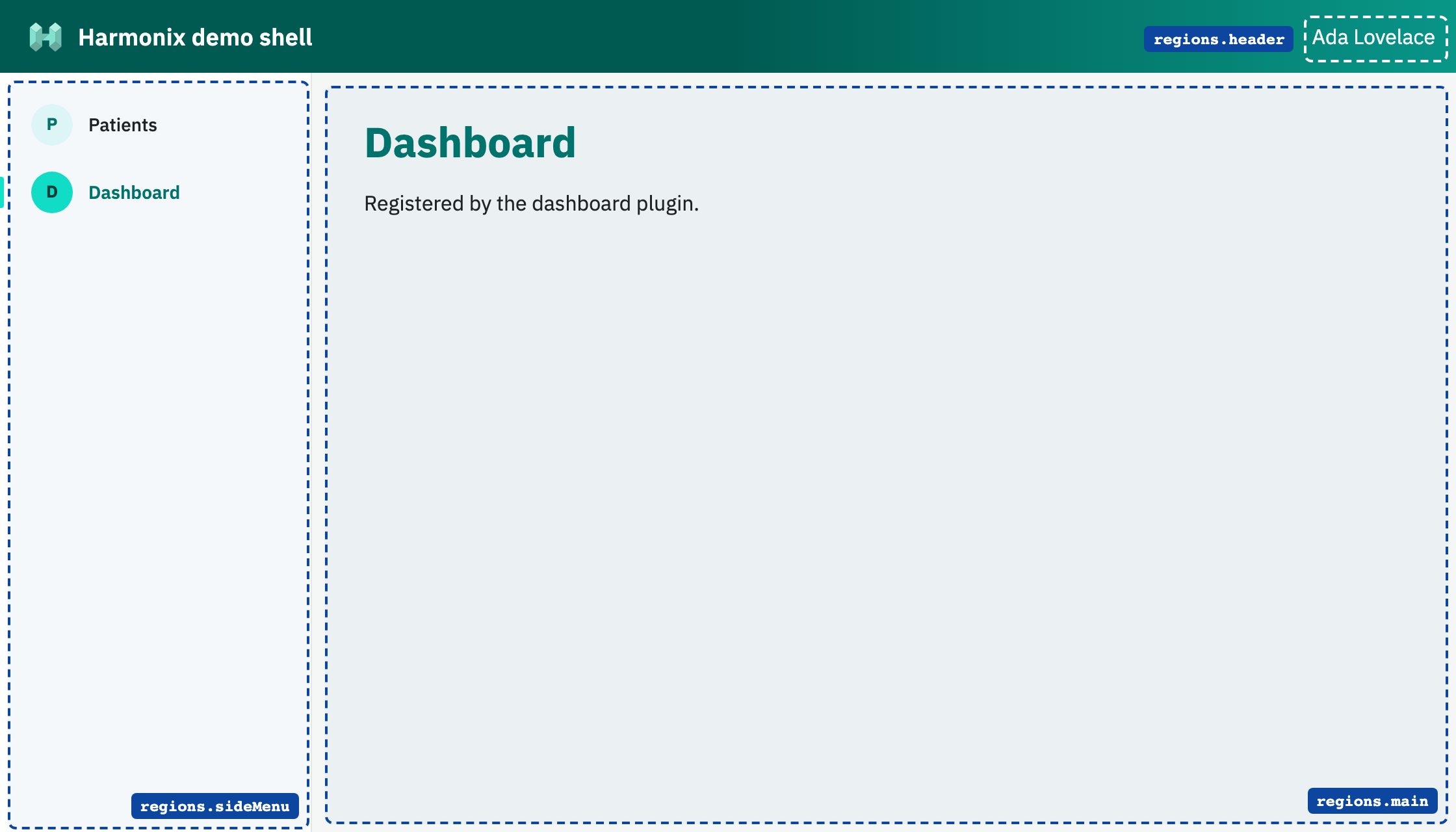
| Region | Name | What goes there |
|---|---|---|
regions.header | header | The top bar, right of the logo: actions, the user, a search box… |
regions.sideMenu | side-menu | The menu: one item for each main view |
regions.main | main | The content. Only one view is active at a time: activating one hides the previous one |
The plugin reads the region names from its API (api.regionManager.regions), so it does not need to write them by hand. In the image, two plugins have each registered a main view and a menu item, and a third one shows the user in the header.
When all the plugins have started, if none has activated a view in main, the shell activates the first one registered. That is why the plugin you create is already visible when you open the page.
The API
Each plugin receives its own API in initialize(api) and dispose(api). It extends the Harmonix API with what this shell offers:
interface DemoShellApi extends HarmonixApi {
  pluginInfo: PluginInfo;               // { pluginId }
  regionManager: DemoShellRegionManager;
  broker: HarmonixBroker;
  createLocaleManager(messages: LocalizationMessages): Promise<HarmonixLocaleApi>;
}
regionManager
The Harmonix region manager, on any region, plus three shortcuts:
| Method | What it does |
|---|---|
registerView(region, view) | Registers a view in a region |
removeView(region, viewId) | Removes it |
activateView(region, viewId) / deactivateView(region, viewId) | Shows or hides it |
isViewActive(region, viewId) / containsView(region, viewId) | Asks about it |
getRegion(region) | The region object of @uxland/regions |
registerMainView(view) | registerView in main |
activateMainView(viewId) | activateView in main |
registerNavigationItem({ id, label, icon?, mainViewId }) | Adds an item to the side menu that activates the mainViewId view of the same plugin. icon is one or two characters; by default, the first letter of label |
A view is { id, factory, isDefault?, sortHint?, removeFromDomWhenDeactivated? }, where factory is an async function that returns an HTML element. The ids only have to be unique within the plugin: the shell stores them as pluginId::viewId.
For example, to show something in the header:
await api.regionManager.registerView(api.regionManager.regions.header, {
  id: "user",
  factory: async () => Object.assign(document.createElement("span"), { textContent: "Ada Lovelace" }),
});
broker
Messages between plugins, without them knowing each other:
- Events:
publish(name, payload)andsubscribe(name, handler). Any number of subscribers; one that fails does not stop the others. - Requests:
registerRequest(name, handler)andsend(name, payload), which returns the handler's answer. One handler per request.
Messages can be identified by a name or by a class. subscribe and registerRequest return an object with dispose(), which the plugin must call in its own dispose.
// Plugin A answers.
const handler = api.broker.registerRequest("patients:count", async () => 42);

// Plugin B asks.
const count = await api.broker.send<unknown, number>("patients:count", {});
createLocaleManager
The translations of the plugin. translate looks the key up in the language of the page (<html lang>), then in the first language given, and if it does not find it, returns the key. Variables go in the text as {{name}}:
const locale = await api.createLocaleManager({
  en: { greeting: "Hello {{name}}" },
  ca: { greeting: "Hola {{name}}" },
});
locale.translate("greeting", { name: "Ada" }); // "Hola Ada" on a page with lang="ca"
Theme
The shell uses the Uxland and Harmonix colors and the IBM Plex Sans font. They are CSS custom properties: views can use them to match the shell, and an application can change them on the harmonix-demo-shell element.
| Variable | Value | Use |
|---|---|---|
--hx-primary | #12e2c7 | Buttons, active item |
--hx-on-primary | #053d37 | Text on --hx-primary |
--hx-primary-text | #00756a | Headings and links |
--hx-primary-deep | #005a52 | Header |
--hx-primary-tint | #e7fcf9 | Soft backgrounds |
--hx-secondary | #0c469f | Kickers and secondary links |
--hx-ink / --hx-ink-muted | #212121 / #4b5563 | Text |
--hx-surface / --hx-background / --hx-border | #fff / #f5f7f7 / #e2e8e7 | Surfaces |
--hx-font | IBM Plex Sans, system fonts | Typography |
Using it outside the creator
The demo shell is a regular npm package. Any project can use it to start one or more plugins:
npm install @uxland/harmonix-demo-shell
import { bootstrapPlugins, initializeShell } from "@uxland/harmonix-demo-shell";

initializeShell(document.body, { title: "My app" });
await bootstrapPlugins([
  { pluginId: "patients", importer: () => import("./patients/plugin") },
  { pluginId: "agenda", importer: () => import("./agenda/plugin") },
]);
initializeShell paints the shell, which takes the whole window. bootstrapPlugins loads the plugins and starts them; a plugin that fails is logged in the console and does not stop the others.
The demo shell is meant for development, examples and documentation. A real application builds its own shell on top of @uxland/harmonix, with the regions and the API its plugins need, as described in Region and view management.