Create a plugin
The quickest way to start a Harmonix plugin is the plugin creator. It generates a project with React, Lit or Angular that already works: a plugin that registers a view and a menu item, running inside a small shell, the Harmonix demo shell, so you can see it from the first minute.
The Sandbox runs the same project in your browser, with React, Lit or Angular.
Requirements
- Node.js 20.19 or later, with npm.
1. Create the project
- React
- Lit
- Angular
npm create @uxland/harmonix-plugin@latest my-plugin -- --template react
npm create @uxland/harmonix-plugin@latest my-plugin -- --template lit
npm create @uxland/harmonix-plugin@latest my-plugin -- --template angular
It creates the my-plugin folder. The folder name is also the plugin id (pluginId) and the package name, so choose it with care: lowercase letters, numbers and hyphens.
Without arguments, npm create @uxland/harmonix-plugin@latest asks for the folder and the framework.
@latestWithout it, npm may reuse an older version of the creator that it already has in its cache, with older templates.
2. Start it
cd my-plugin
npm install
npm run dev
Open the address shown in the terminal: http://localhost:5173 for React and Lit, http://localhost:4200 for Angular.
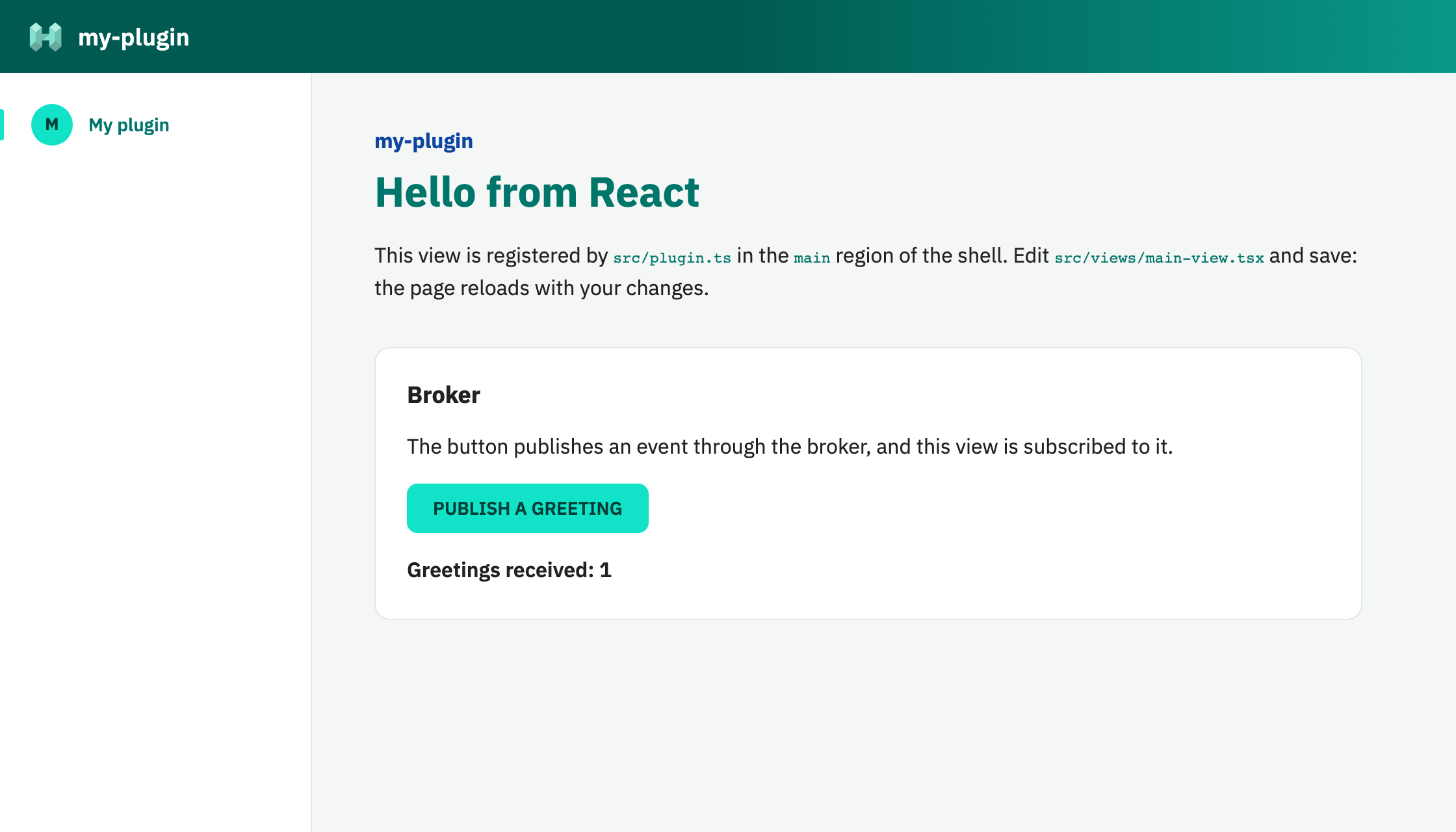
What you see:
- The demo shell: a header, a side menu and the content area. Each of them is a region where plugins inject their views. The shell has no views of its own.
- Your plugin, which has registered two views: the My plugin item in the side menu, and the page in the content area, which is active.
- The broker at work: the button publishes an event and the same view, subscribed to it, counts it. Any other plugin could publish or listen to that event.
Edit the view and save: the page reloads with your changes.
3. Build it
npm run build
The result is a single file, dist/index.js, with your plugin and nothing else: the framework and the shell stay out of the bundle, because the application that loads the plugin provides them. That file is the one you upload to the Plugin Store. See Build and publish.
Next steps
- Project structure: what each generated file does.
- The demo shell: its regions and the API your plugin receives.
- Framework notes: what to keep in mind with React, Lit and Angular.
- Regions and views and best practices, to keep growing the plugin.